Ultra BMSDocs
Demo

What posts to your accounts automatically

You do not type journal entries for expenses, vendor bills, stock movements or held cheques. The app posts them for you, to the accounts below.

FinanceUpdated 07/10/2026 · 2 min read

In this article

The rules

Each event below posts at the moment you save or confirm it. Stock is carried as an asset at cost until it is used, so every stock movement posts its value. The accounts are system accounts, so you see them as Locked in the chart of accounts.
When you: Record an expense
Debit: The expense account you chose (and 1455 VAT Input - Recoverable where the VAT is recoverable)
Credit: 2101 Vendor Payables
When you: Mark that expense as paid
Debit: 2101 Vendor Payables
Credit: The account you paid through: 1101 Operating Account for bank or card, 1103 for cash, or 2104 Employee Reimbursements Payable when an employee paid
When you: Repay an employee
Debit: 2104 Employee Reimbursements Payable
Credit: 1101 Operating Account
When you: Post a vendor bill
Debit: 5107 Vendor Services Expense, and 1455 VAT Input - Recoverable for the VAT
Credit: 2101 Vendor Payables
When you: Pay a vendor bill
Debit: 2101 Vendor Payables
Credit: 1101 Operating Account
When you: Post a vendor bill that carries reverse charge
Debit: 1455 VAT Input - Recoverable
Credit: 2500 VAT Payable - Reverse Charge
When you: Record goods receipt for a stock item
Debit: The item's stock account (code 1401 by default)
Credit: The item's purchase account (5105 Materials & Supplies by default)
When you: Write off damaged or expired stock
Debit: 5604 Stock Write-off
Credit: The item's stock account
When you: Return stock to the supplier
Debit: 2101 Vendor Payables
Credit: The item's stock account
When you: Count or correct stock and find less than the book says
Debit: 5604 Stock Write-off
Credit: The item's stock account
When you: Count or correct stock and find more than the book says
Debit: The item's stock account
Credit: 5604 Stock Write-off
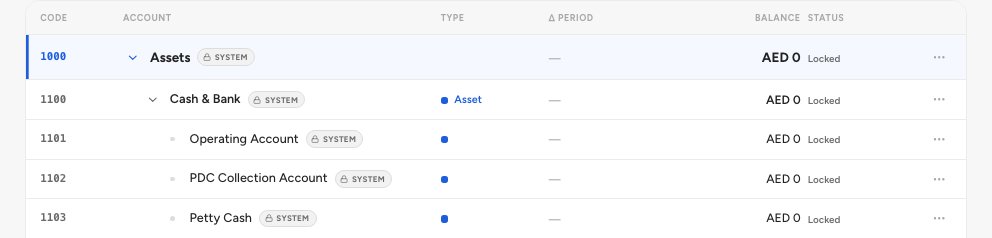
The chart of accounts with the system accounts that documents post to, such as 1101 Operating Account and 1102 PDC Collection Account
  1. 1101 Operating Account
  2. 1102 PDC Collection Account

Cheques you hold

A post-dated cheque in your drawer is not cash. It is held in 1102 PDC Collection Account until the bank clears it, so your bank balance never counts a cheque that has not cleared.

If you edit or delete

Editing or deleting a recorded expense does not leave the old posting behind. The system posts a reversal of the original. For an edit, the new figures are posted as well.

See the postings behind an account

Open Finance › Chart of accounts and search for Vendor Payables. Open the menu at the end of its row and choose Open account page.

The account shows its closing balance and its Posting source 1, which reads Automatic.
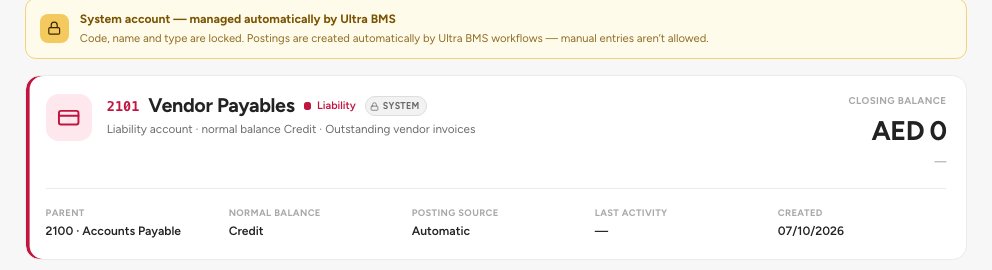
The Vendor Payables account, with its closing balance and the Posting source Automatic
  1. Posting source: Automatic

Tip — Wrong amount on an expense? Edit the expense. Do not look for the account to correct by hand.

FAQ

Can I post a journal by hand to a system account?

No. System accounts are locked so the postings above stay reliable.

What if my organisation has no chart of accounts yet?

The event is saved and nothing is posted. Ask us to set up your chart of accounts.

Related guides

Was this helpful?