Company profile
Your legal name, address, TRN and logo, in English and Arabic. They print on your invoices, quotations and official documents.
In this article
Before you start
- You hold a role that can edit the company profile, such as Admin.
Fill in the profile
Open Admin › Settings, then the Organization tab, then Company profile.
Click Upload logo 1 and choose a PNG or JPG of up to 2 MB. A square logo works best. Under Legal details, enter the Legal company name 2, the Registered address, the City and Country, and your Tax Registration Number (TRN) 3.
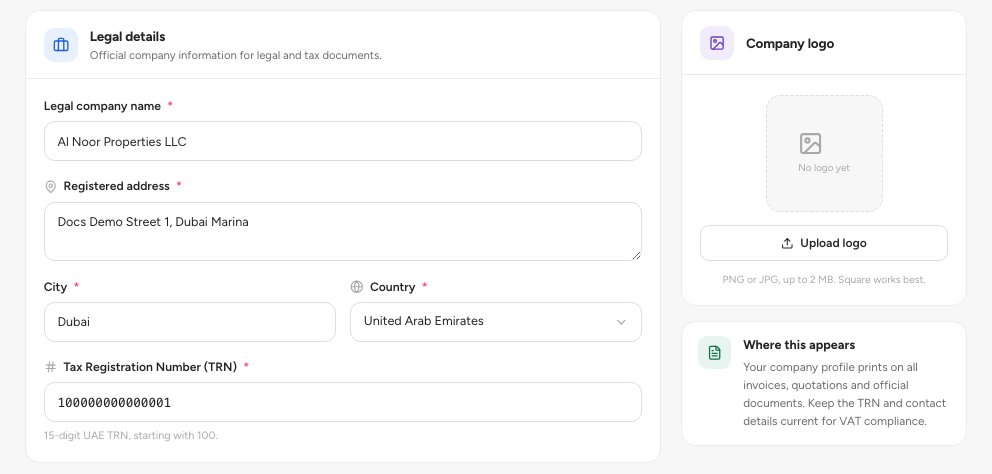
- Upload your logo
- Legal company name
- Tax Registration Number (TRN)
Under Contact information, enter the Phone number 1 and Email address 2. Fax number and P.O. Box are optional. Under Arabic / bilingual details, enter the Arabic company name 3 and the Arabic company address for bilingual documents and receipts.
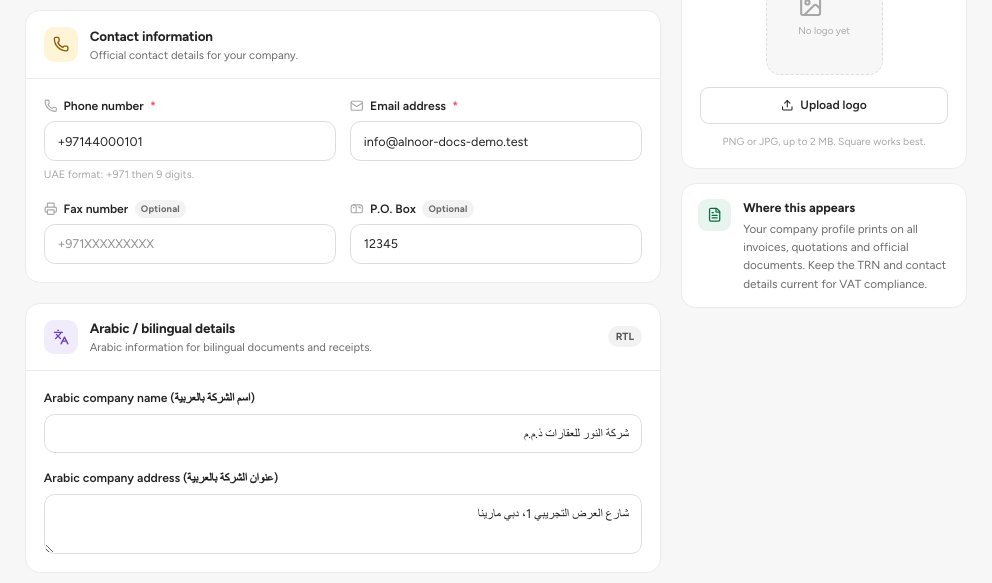
- Phone number
- Email address
- Arabic company name
When the bar You have unsaved changes appears at the bottom, click Save changes.
Important — Save the profile once before you upload a logo. The logo button is switched off until the profile exists.
Fields
FAQ
I can see the profile but not edit it.
A banner says Read-only access. Ask an administrator to change it or to change your role.
Where does the profile appear?
On invoices, quotations and other official documents your workspace prints.
Related guides
Was this helpful?