Record an expense
Record a cost that has no purchase order, code it to an account, say how it was paid, and keep the receipt.
Before you start
- A vendor in Vendors if you want the cost linked to one.
Record an expense
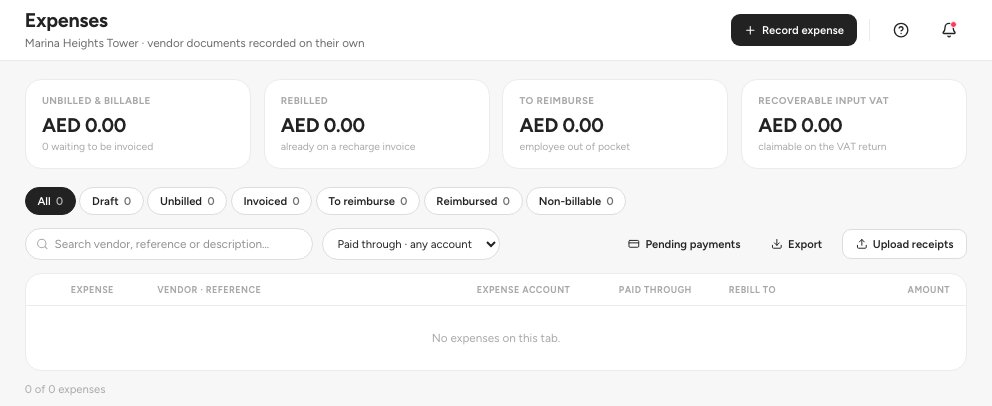
Open Purchase › Expenses 1. The tabs 2 group expenses by state.
- Expenses
- Tabs: All, Draft, To reimburse and more
- Record expense
Click Record expense 3, or Upload receipts to capture a receipt first and code it later.
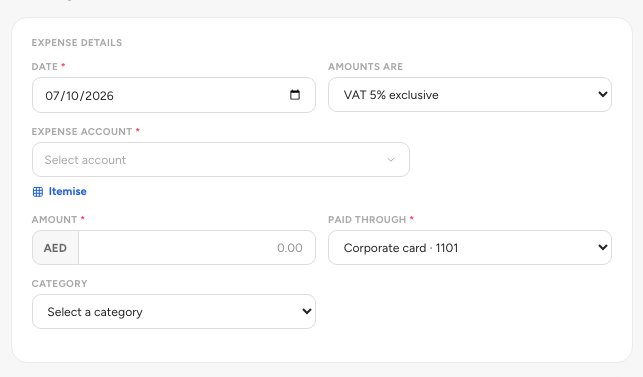
Enter the Date, say how the amounts are entered under Amounts are, and choose the Expense account 1. Enter the Amount.
- Expense account
- Amounts are
- Paid through
Choose Paid through 3: Bank account, Petty cash, Corporate card or Employee (reimbursable).
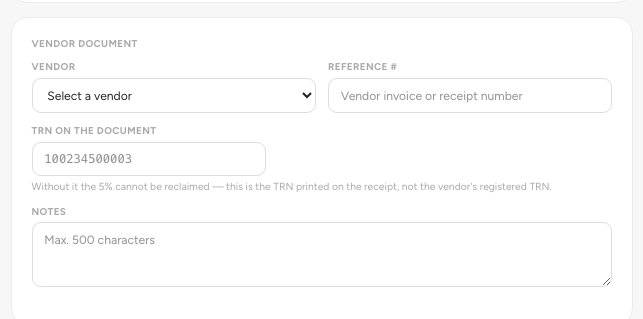
Under Vendor document, pick the Vendor 1, the Reference # from their invoice or receipt, and the TRN on the document 2.
- Vendor
- TRN on the document
Attach the receipt, check the Document total, and save.
What this does to stock and the ledger
An expense changes no stock. If you buy goods to hold, use a purchase order and goods receipt so the quantity and its value are recorded. Recording debits the expense account (and 1455 VAT Input - Recoverable where the VAT is recoverable) and credits 2101 Vendor Payables. Marking it paid debits 2101 and credits the account you paid through. An employee-paid expense credits 2104 Employee Reimbursements Payable instead, until you repay it.
Tip — Editing or deleting a recorded expense posts a reversal of the original, so your books stay correct.
Where it sits in the chain
An expense is the short route through buying: Vendor, then Expense, then Payment, with no order, no goods receipt and no bill matching. It sits beside the purchase order chain and ends in the same place, the vendor payable and the account you paid through. Pending payments lists what is still to pay.
FAQ
When do I use an expense and when a purchase order?
Use a purchase order when you order goods and want approval, receipt and bill matching. Use an expense for a cost you already paid or owe with no order.
Where do I see what I still owe on expenses?
Open Pending payments from the Expenses screen. It lists the expenses that still need paying.
Related guides
Was this helpful?