Rent collection and a tenant portal.
In Arabic and English.
Invoice the rent, remind tenants before it is due, record every payment with a receipt and see what is owed in each building. Your tenants get a portal of their own, in Arabic or English.
- 14-day free trial, set up by our team
- Published plans, billed yearly
- Free onboarding and data migration
Shown with sample data.
Rent invoices, sent and followed up
Every rent invoice in one list, with how much of the period is collected.
- Created with the leaseOnboarding a tenant creates the lease’s invoices from its payment plan, so nothing is typed twice.
- Draft, then sendAn invoice reaches the tenant only when you send it: it is emailed with its PDF and becomes Sent. Send a whole page of drafts at once.
- Tax invoices with TRNsEach invoice shows the issuer and recipient TRNs and the net and VAT by category. A sent invoice is corrected with a credit note, never deleted.
- Overdue, every nightUnpaid invoices past their due date turn Overdue overnight. Tabs show Paid, Outstanding, Overdue and Drafts; filter by month, method or amount, and export.
Rent reminders by email
Reminders go out on time without anyone keeping a diary, and your team can nudge a tenant in one click.
- Seven days before the due dateUltra BMS emails the tenant a payment reminder 7 days before an invoice is due.
- One click from the invoiceSend reminder on any invoice emails the tenant what is due.
- In the tenant’s languageFrom the contract, the Payment reminder message fills in the contract’s figures and goes out in the tenant’s own language, Arabic or English.
- Every contact on recordLog a call, a WhatsApp message, an SMS or a visit on the contract, so the whole team sees who said what.
Record payments and issue receipts
However the tenant pays, the payment is recorded against the invoice and a receipt is ready.
- Every way tenants payRecord cash, bank transfer, card, cheque or post-dated cheque, with the date, the reference and a proof file.
- A receipt for every paymentPreview and download the receipt as soon as the payment is saved; every receipt stays in the payment history.
- Cheques record themselvesMarking a post-dated cheque cleared records its payment against the invoice.
- Contract statementEvery charge and payment on a contract with the running balance, in English and Arabic, as PDF or Excel. Deposits are listed apart.
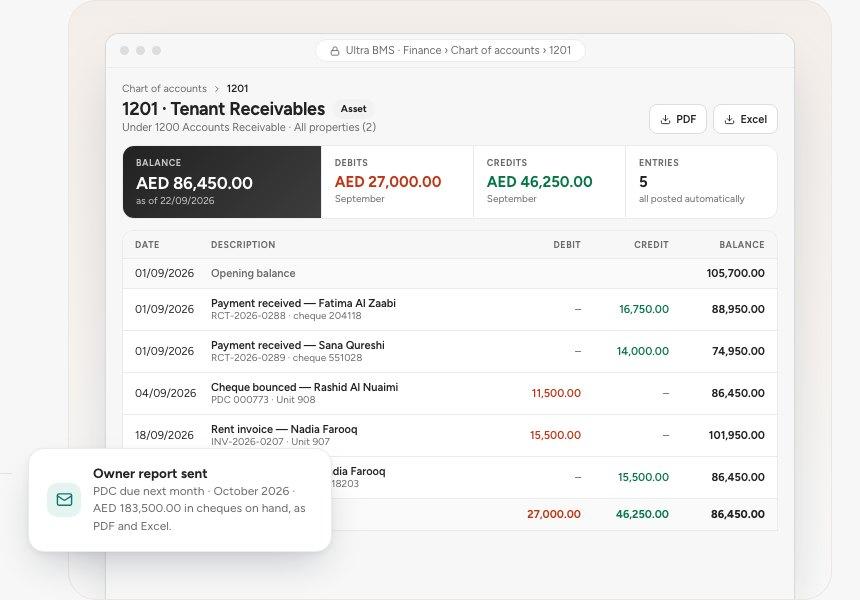
- Posted to the ledgerRent invoices and receipts post to your chart of accounts on their own.
See what tenants owe, per building
Pick one building, several or all of them, and every figure follows.
- Receivables on the dashboardWhat tenants owe, what it is for, how late it is (from 0–30 days up to over 180) and the tenants who owe the most.
- Overdue now on every contractOne figure on the contract page, beside what remains and the next payment.
- Deposits kept apartSecurity and utility deposits are held separately from rent, with their own actions.
A tenant portal in Arabic and English
Tenants sign in to a portal of their own. Each tenant picks Arabic, right to left, or English.
- Their lease and unitThe unit, the lease dates and the days remaining, with the lease PDF to download.
- Requests and complaintsTenants raise maintenance requests and complaints from the portal, and see your replies.
- Your announcementsBuilding announcements reach every tenant, with attachments, publish dates and expiry dates.
- Profile and documentsTenants keep their profile up to date and upload their documents.
- Renewal requestsA tenant can ask to renew from their lease page; you approve, reject or counter.
- No payments in the portalThe portal takes no payments. Tenants pay as they do today, and your team records each payment and sends receipts and statements.
Questions, answered.
Something we haven’t covered? Talk to our team, or see what it costs.
One workspace for the whole tenancy.
Every part below is on every plan.
- PDC managementDeposit schedule, bounced cheques, replacements, receipts and cheque printing.Open
- Owner reportsOwner statements, PDC reports, rent forecasts and per-building figures.Open
- Property maintenanceWork orders, preventive maintenance, tenant requests and vendors.Open
- Lease renewals and registrationRenewals with owner-level approval, and Ejari and Tawtheeq records.Open
- All featuresThe eight modules, from portfolio to team control.Open
- PricingPublished plans, quoted per month and billed yearly in AED.Open
See it on a portfolio like yours.
Book a 30-minute demo, or ask for a 14-day free trial. Our team sets up your trial account within one business day.