Property maintenance and work orders.
From request to signed job card.
Log a job, give it to your technician or a vendor, and follow it to a signed job card. Preventive checks schedule themselves, and every job’s cost stays with the building.
- 14-day free trial, set up by our team
- Published plans, billed yearly
- Free onboarding and data migration
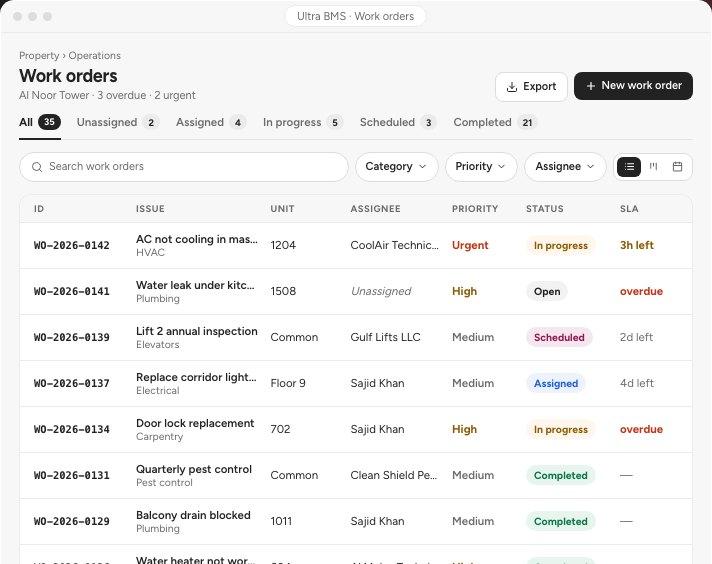
Shown with sample data.
Work orders with priority, SLA and an owner
Every job for a building, a unit or a common area, with who has it and how long is left.
- Raise a jobPick the building, the unit or area, a category such as HVAC or plumbing, the priority and the scheduled date.
- Assign itGive it to your technician or a vendor; reassigning asks for a reason.
- Follow the statusUnassigned, Assigned, In progress, Scheduled, Completed and Rework, each one click away.
- SLA and reworkThe time left on the SLA shows on every job. A job sent back becomes a Rework order and its SLA clock restarts.
- Close it properlyComplete with hours, notes and photos. If the repair did not hold, raise a follow-up work order linked to the first.
- Materials and job cardDraw materials from stock, costed to the job, and print the job card and the receipt the tenant signs.
Preventive maintenance that schedules itself
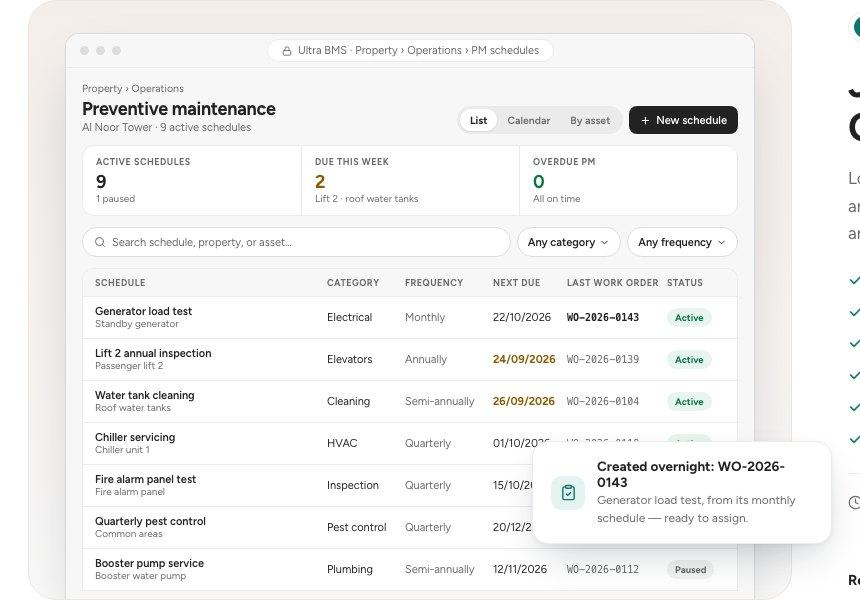
Set up the lift check, the chiller service and the pump inspection once. The work orders arrive on time.
- Weekly to yearlyWeekly, monthly, quarterly, every six months or every year, for an asset or a location.
- Or by meterA meter reading recorded on a job can make meter-based maintenance due.
- Work orders every nightEach schedule raises its work order on its own, every night.
- See what is dueList, calendar and by-asset views; filter what is due in the next 7 days, overdue included.
- Compliance and safetyCompliance inspections and violations, fire-equipment refill alerts and maintenance agreement renewal alerts.
Tenant maintenance requests and complaints
Tenants report problems from their portal, in Arabic or English, and your team turns them into work.
- Requests from the portalA tenant’s maintenance request lands in your list, waiting to become a work order.
- One click to a work orderRaise work order on the request opens the job form, then goes straight on to assigning it.
- Complaints with repliesComplaints carry replies and attachments, so the tenant sees the answer.
- On the contractThe contract page lists the maintenance requests of that tenant.
Vendors, quotations and maintenance agreements
Outside contractors are part of the same flow, with their ratings, papers and contracts on record.
- Ratings and rankingEach vendor’s average rating from completed work orders, ranked by service category.
- Papers that do not lapseTrade licence and insurance tracked; a vendor whose licence or insurance has expired is suspended.
- Quotation requestsAsk several vendors for prices by email, in English or Arabic, type their replies in, and compare line by line with the lowest marked.
- Award with a reasonAwarding with fewer than 3 quotes, or not to the lowest, asks for a reason. The award becomes a purchase order.
- Maintenance agreementsYearly agreements with term, value, covered assets and response times, with renewal reminders 60 and 30 days before the end.
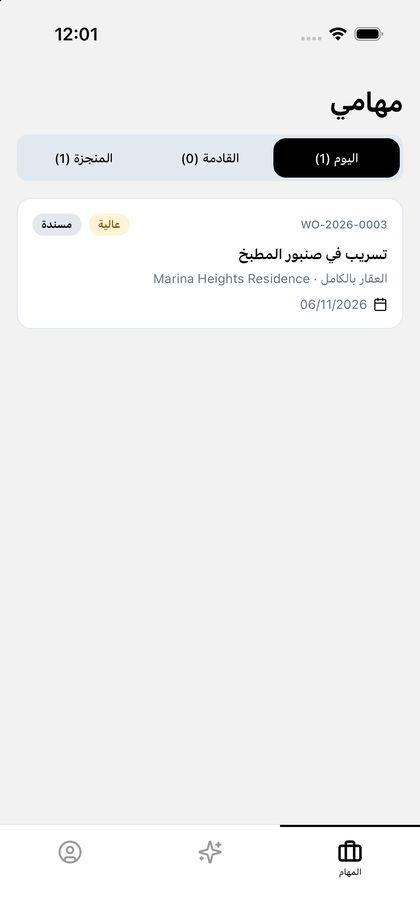
A technician phone app, coming soon
The Ultra BMS phone app for iPhone and Android is coming soon. Until it ships, your team runs every job from the web.
- Today, Upcoming and DoneEach technician sees their own jobs, in Arabic or English.
- Before and after photosPhotos to start and close the job, and progress updates the property manager sees on the work order.
- Getting thereCall the tenant or open the building in Maps, with the access notes.
- The signed job cardClose with notes and hours, then photograph the job card the tenant signed.
Questions, answered.
Something we haven’t covered? Talk to our team, or see what it costs.
One workspace for the whole tenancy.
Every part below is on every plan.
- PDC managementDeposit schedule, bounced cheques, replacements, receipts and cheque printing.Open
- Rent collection and tenant portalRent invoices, reminders, payments, receipts and a bilingual portal.Open
- Owner reportsOwner statements, PDC reports, rent forecasts and per-building figures.Open
- Lease renewals and registrationRenewals with owner-level approval, and Ejari and Tawtheeq records.Open
- All featuresThe eight modules, from portfolio to team control.Open
- PricingPublished plans, quoted per month and billed yearly in AED.Open
See it on a portfolio like yours.
Book a 30-minute demo, or ask for a 14-day free trial. Our team sets up your trial account within one business day.