Post-dated cheque management.
Every PDC, from safe to bank.
In the UAE a year’s rent usually arrives as a stack of post-dated cheques. Ultra BMS keeps every one in a single register: where it is, when it is due, and what happened to it. Deposit, clear, bounce, replace or withdraw, with each step kept on the cheque.
- 14-day free trial, set up by our team
- Published plans, billed yearly
- Free onboarding and data migration
Shown with sample data.
One PDC register for every building
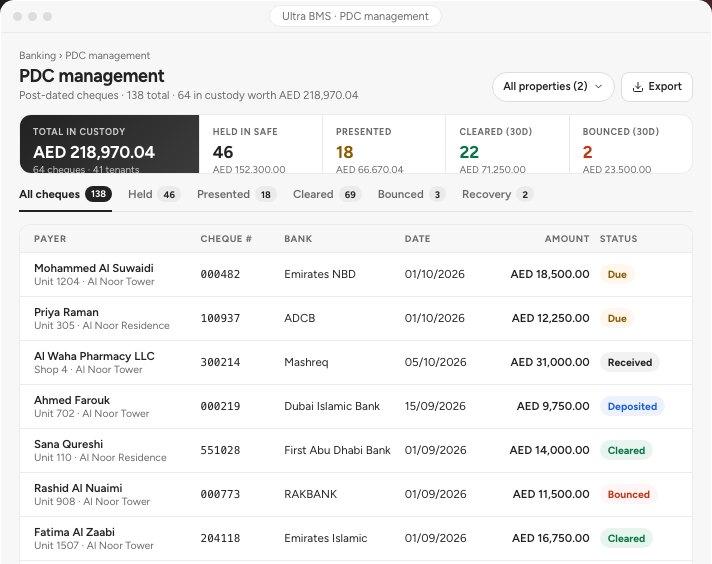
Every post-dated cheque you hold or have sent to the bank is in one list, with the tenant, the unit, the bank, the amount and the status.
- Custody at a glanceA strip at the top totals the cheques in your custody: held in the safe, presented to the bank, and the amount in AED.
- Pipeline and bounce rateSee how many cheques were held, presented, cleared and bounced over the last 90 days, with the bounce rate below.
- Find any chequeSearch by cheque number, tenant or unit, and use the status tabs to show only held, presented, cleared or bounced cheques.
- Import and exportUpload an Excel file of post-dated cheques for several tenants and check the rows before saving. Export the register, with your filters, as a spreadsheet.
A PDC deposit schedule that reminds you
Cheques are planned on the quotation, recorded when the tenant is onboarded, and then come to you on their dates.
- Planned on the quotationSet the number of cheques and their dates on the quotation. Redistribute evenly splits the rent into equal cheques.
- Recorded at onboardingWhen the quotation becomes a tenant, the cheque details are captured, and each cheque scan is read for you to check.
- Due seven days aheadEvery morning, cheques dated within the next 7 days turn Due, so the week’s deposits are one tab away.
- Deposit reminders by emailAdmins and property managers get an email the day before and on the day a cheque is due for deposit.
- Deposit, then mark clearedThe cheque’s main button follows its status. Marking it cleared records the payment against the rent invoice, with its receipt.
Bounced cheques and replacements
A returned cheque is a normal part of renting in the UAE. Ultra BMS walks you through it and keeps the trail.
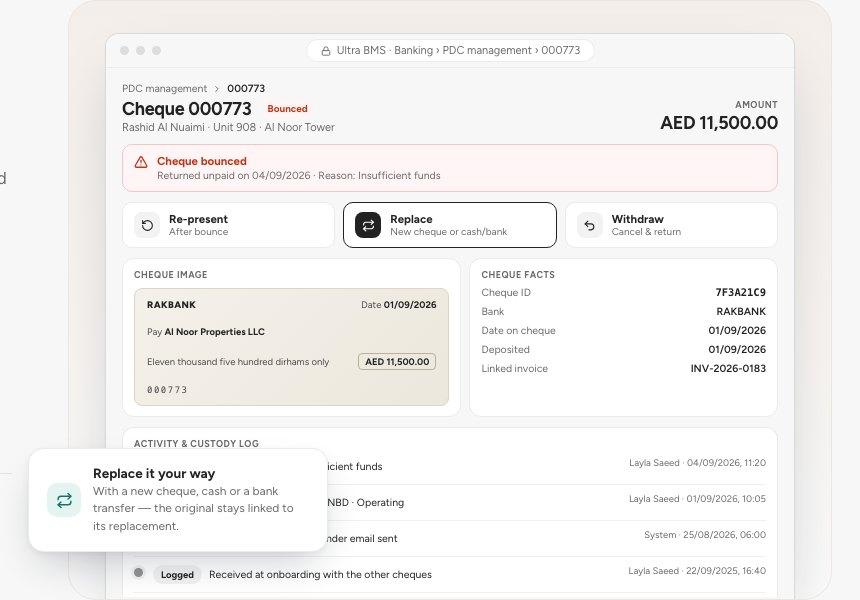
- Record the bounceEnter the bounce date and reason. The cheque turns Bounced and your team is alerted; if it had already cleared, its receipt is cancelled and the tenant is emailed.
- Re-present or replaceRe-present the cheque, take a new cheque from the tenant, or settle it in cash or by bank transfer. Settling records a real payment against the invoice.
- Withdraw before the bankGive a held or due cheque back to the tenant with a reason: early termination, a change of payment method, a tenant request or another reason. The withdrawals list keeps each one.
- Undo a mistakeUndo a deposit recorded in error. Undo a clearance: the payment is reversed and its receipts voided, both kept in the history, and the invoice reopens.
- The history stays with the chequeEvery deposit, bounce, replacement and print is in the cheque’s own history, so anyone can see what happened.
Cheque printing and bilingual PDC receipts
Print the tenant’s cheques on the bank’s own leaf, and hand the tenant a receipt in English and Arabic for the cheques they gave you.
- One layout per bankPlace each bank’s fields once on a scan of its leaf. Several banks can go in one print run.
- Only what may be printedThe date, payee and amount in figures and words print, with the amount in Arabic words if the leaf has the line and the A/C Payee Only stamp on by default. The tenant signs; the signature is never printed.
- Reprints ask whyA second print asks for a reason, which is logged beside the first print.
- Scans checked against the printAfter the signed cheques are scanned, a cheque whose bank, number, date or amount differs from what was printed is flagged.
- PDC receipt in English and ArabicEach cheque with its number, date, bank and amount, the total in words, the cheque conditions of the property’s emirate and the signature lines, with a copy of every cheque on page 2.
PDC reports: cheques due and collected
Know what is coming to the bank and what has cleared, for one building, several or all of them.
- PDC dueCheques dated in the period that have not cleared yet, in hand or at the bank, per property.
- PDC collectedCheques cleared in the period, by property, with a reversal line for one that later bounced.
- For the ownerBoth reports go to an owner as a PDF or by email, one owner per document under one letterhead; your staff Excel shows subtotals per property.
Questions, answered.
Something we haven’t covered? Talk to our team, or see what it costs.
One workspace for the whole tenancy.
Every part below is on every plan.
- Rent collection and tenant portalRent invoices, reminders, payments, receipts and a bilingual portal.Open
- Owner reportsOwner statements, PDC reports, rent forecasts and per-building figures.Open
- Property maintenanceWork orders, preventive maintenance, tenant requests and vendors.Open
- Lease renewals and registrationRenewals with owner-level approval, and Ejari and Tawtheeq records.Open
- All featuresThe eight modules, from portfolio to team control.Open
- PricingPublished plans, quoted per month and billed yearly in AED.Open
See it on a portfolio like yours.
Book a 30-minute demo, or ask for a 14-day free trial. Our team sets up your trial account within one business day.